Blog
What is Dual Pairing in Headphones and How Does the GM G+ Use It?
Updated on Jun 2026
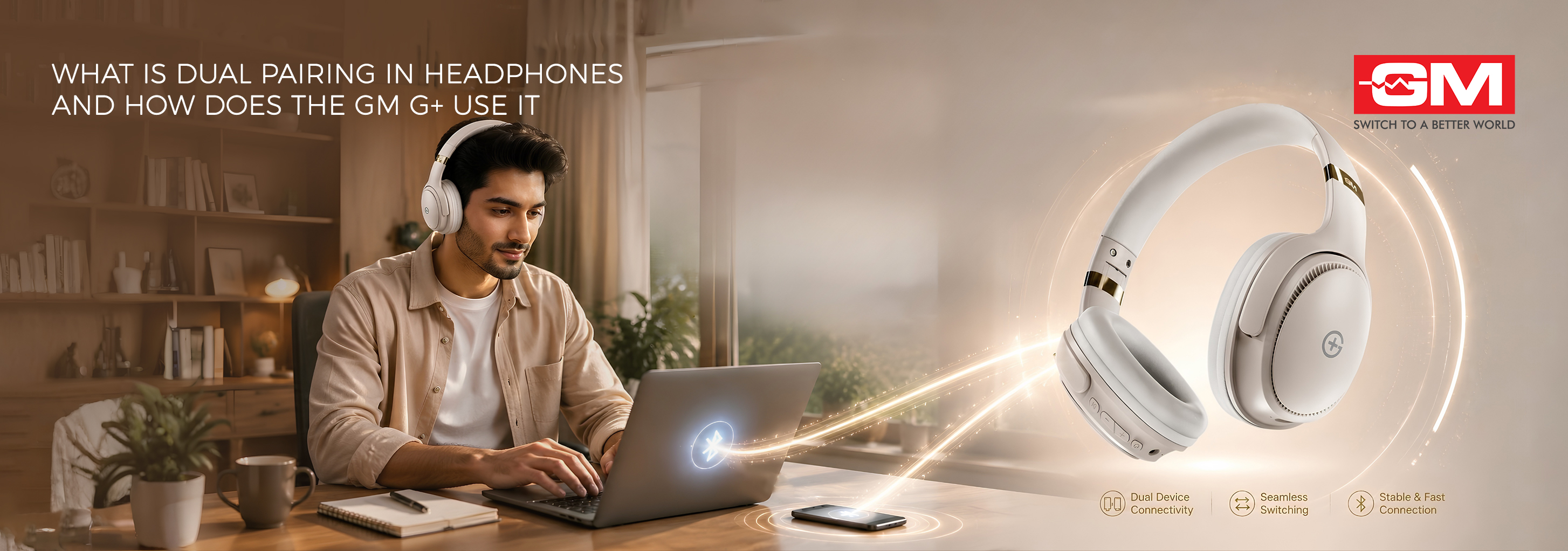
You pause a Zoom meeting to reconnect your headphones to the phone. By the time the audio returns, you have missed the client’s question. If this sounds familiar, you know the friction that sits between your laptop and smartphone each day. Dual pairing removes it, and headphones like the GM Modular G+ are built around this convenience. In this guide, we explain what dual pairing means, how it works in wireless headphones, and how the GM G+ uses it to keep you connected to everything at once.
Understanding Dual Pairing: What Does It Mean?
So, what is dual pairing in headphones? In simple terms, it is a feature that lets a single pair of headphones connect to two devices at the same time. You no longer choose between your phone and laptop, because both stay linked simultaneously.
The technical name for this capability is Bluetooth Multipoint. This is the technology that allows a headset to maintain active connections with at least two devices at once, ready to switch between them on demand.
Here is a practical example. Your headphones can stay paired with your laptop for video meetings while remaining connected to your smartphone for calls. When a call comes in, the audio shifts automatically, exactly how the GM G+ behaves. That is what dual pairing delivers: convenience without constant reconnection.
How Does Dual Pairing Work in Wireless Headphones?
Dual pairing in wireless headphones works through a simple hierarchy. One device acts as the primary source while the other waits in the background, ready to take over the moment it plays something. This is a clear step beyond ordinary Bluetooth headphones, which link to a single device and need manual reconnection every time you switch.
The headset listens to both connections and decides which audio stream plays. Active streams take priority over paused ones, which is why an incoming call interrupts music.
Here is how the process typically unfolds:
-
Device recognition: The headphones store the Bluetooth profiles of both devices, so they reconnect automatically when those devices are in range.
-
Audio prioritisation: When two devices try to play sound, the headset prioritises the more urgent stream, usually an incoming call over background media.
-
Seamless switching: When the higher-priority audio ends, the headset returns to the previous source on its own.
Top Benefits of Using Dual-Pairing Headphones
Once you understand what dual pairing offers, the everyday advantages become clear. It is less a luxury and more a genuine productivity upgrade for anyone who juggles multiple screens.
Key benefits include:
-
Higher productivity: You can stay in a laptop meeting and still take an urgent mobile call without scrambling through menus.
-
No missed calls during media: Editing a presentation while listening to music no longer means missing calls, as your phone stays connected throughout.
-
No repetitive pairing: You skip the tedious cycle of reconnecting devices each time you shift between a Teams call and a WhatsApp call.
-
Smoother daily routines: Switching between work and entertainment, even a quick call while gaming, feels natural.
For anyone comparing the best wireless headphones today, dual pairing is now an essential feature rather than an optional extra.
Also Read: How to Choose the Best Speakers for Your Home Audio Setup
Introducing the GM G+: Redefining Your Audio Experience
Picture a hybrid day: morning calls at your desk, a podcast on a coffee run, then an evening film. The GM G+ Wireless Bluetooth Headphones follow you through all of it, switching between devices so smoothly you stop noticing the technology.
The specifications back up the experience. Built on Bluetooth 5.3, the GM G+ holds a stable connection even in crowded spaces, and dual pairing keeps your laptop and phone linked at once. A low-latency mode of around 50ms keeps audio in sync for gaming, while 40mm Pure Bass drivers deliver rich sound. With up to 70 hours of playtime, you can go days between charges.
Unlike ordinary Bluetooth headphones that need a manual reconnection with every switch, this GM headphone moves between devices in moments. With a built-in mic, IPX4 splash resistance, and cushioned comfort, it is a strong pick for anyone seeking the best bluetooth headphone from GM Modular.
How to Connect Your GM G+ Using Dual Pairing
Setting up your device is simpler than you might expect. Follow these steps to connect your GM G+ wireless headphones to two devices at once:
-
Pair the first device: Switch on your GM G+ and activate pairing mode. Open the Bluetooth menu on your first device, select the GM G+, and wait for the connection to confirm.
-
Pair the second device: Briefly turn off Bluetooth on the first device. Put the GM G+ back into pairing mode, then connect your second device through its Bluetooth menu.
-
Reconnect the first device: Switch Bluetooth on the first device back on. It will reconnect automatically, leaving both devices linked to your headphones at the same time.
Once both devices are paired, the GM G+ remembers them, so future connections happen on their own.
Safe Listening and Device Care
Enjoying your headphones responsibly helps protect both your hearing and your device. Listen at moderate volumes and take regular breaks during long sessions, as sustained loud audio can affect hearing over time. For charging, use only the cable provided with your GM G+, since unverified cables may damage the battery or shorten its lifespan. Unplugging the headphones once they are fully charged also helps preserve long-term battery health, so you get dependable performance for longer.
Dual pairing turns the daily juggle between devices into one smooth, uninterrupted experience, and the GM G+ executes it reliably. With Bluetooth 5.3, stable multipoint connectivity, and up to 70 hours of playtime, it is built for anyone who values a connected lifestyle. Stop losing minutes to reconnecting devices and move through your day uninterrupted. With the GM G+ from GM Modular, you can work, call, stream, and switch devices without ever breaking focus.
Frequently Asked Questions
1. What is dual pairing in headphones?
Dual pairing in headphones lets a single pair of headphones connect to two devices at the same time. It uses Bluetooth Multipoint technology, so you can switch between devices without reconnecting manually.
2. Does dual pairing drain the battery faster on wireless headphones?
Maintaining two connections can use slightly more power than a single one. However, modern wireless headphones are highly efficient, so the difference is usually minor. The GM G+, for example, offers up to 70 hours of playtime per charge.
3. What makes the GM G+ one of the best bluetooth headphone options?
The GM G+ pairs Bluetooth 5.3 with stable dual pairing, a low-latency mode of around 50ms, and up to 70 hours of playtime. Its 40mm drivers and cushioned, IPX4-rated design make it a dependable choice for daily multitasking.
4. Can I play audio from both connected devices at the same time?
No, only one audio stream plays at a time. The headphones stay connected to two devices simultaneously, but they switch between sources intelligently, typically prioritising an incoming call over media already playing.
5. How do I reset the dual pairing memory on my GM headphone?
Clear the GM G+ from the Bluetooth settings of both devices, then hold the power or pairing button as described in your GM Modular product manual until the headphones reset. This clears all stored connections.
Related Blogs
Bladeless Fan Buying Guide: 10 Checks | GM Modular
Bladeless Fan Buying Guide: 10 Things to Check Before You Buy A bladeless fan looks like the obvious upgrade. No spinning blades, a slim tower, a quiet hum, and a price that hints it must be the better choice. But the word “bladeless” on
Read More
What Is a GaN Charger? A Simple Guide
What Is a GaN Charger? Everything You Need to Know You have probably used gallium nitride for years without knowing it. Before it reached the charger on your wall, this material lit up the first white LEDs, powered blue lasers, and read the discs in
Read More
GM Artic Air 1: 3-in-1 Bladeless Tower Fan
Why the GM Artic Air 1 Is the Ultimate 3-in-1 Appliance for Every Season Picture one slim tower in the corner of your living room. In May, it cools you through a brutal afternoon. In August, it clears the damp, stale air the monsoon leaves beh
Read More
Wireless Charging vs Wired Charging: Which Is Faster?
Wireless Charging vs Wired Charging: Which Is Faster? If your phone is at 10% and you have twenty minutes before heading out, which charger should you grab: the cable or the pad? Wireless charging is everywhere now, yet most of us still reach for a
Read More